Skip to main content
How to edit a hunt application.
-
If an application has already been submitted, it can be edited up until the close of the application period. To do so, log in to your account at www.ndowlicensing.com. (NOTE: This does not include switching from Regular to Junior, or from Bonus Points Only to Regular, an application would have to be withdrawn in those instances).
- Select the “Applications and Points” section on the left-hand menu.
- Use the year and species filters if you do not already see the application you wish to edit.
- Click on the arrow drop down on the far right next to your application to expand the application for details.
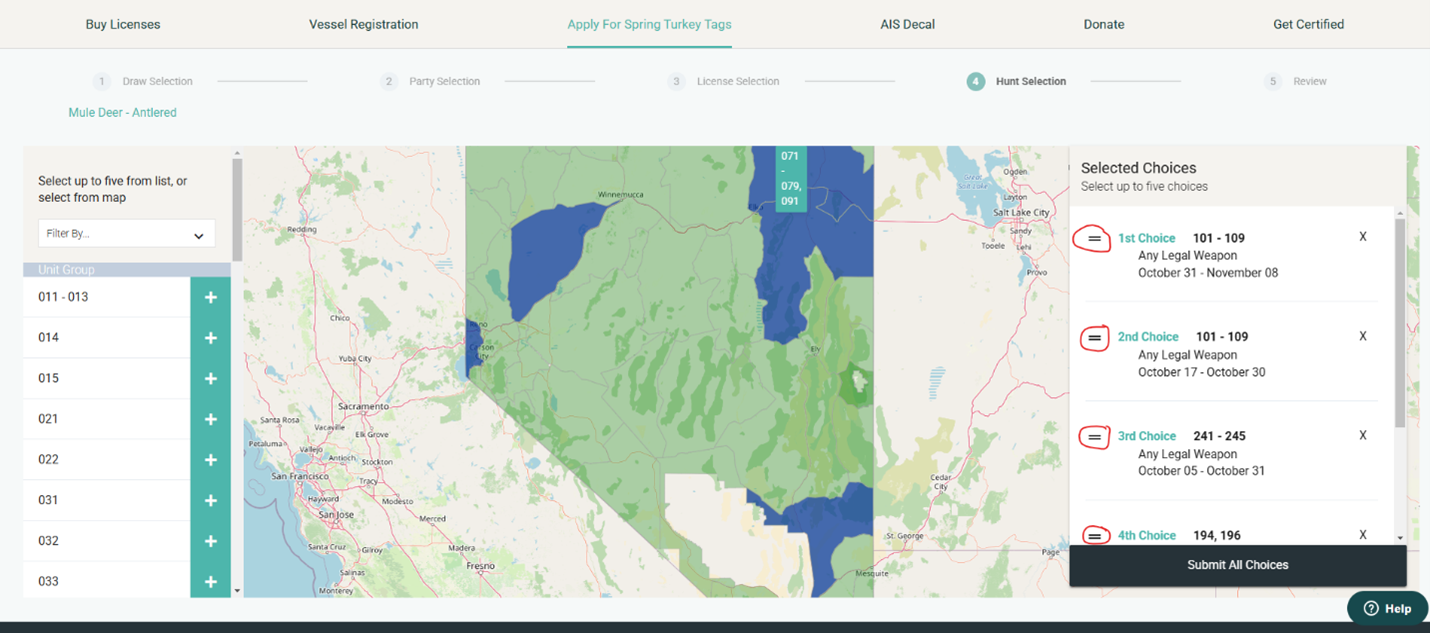
- Click the “Edit Choices” button found at the bottom of the application. This selection will take you back to the map page of the application period where you can repeat step 4.
- To reorder these hunt choices, click and hold the = shown in the choices box next to the hunt choice you wish to move. Drag the choice up or down to reorder your choices to your liking.
- To remove a hunt choice, select the X shown in the choices box next to the hunt choice you wish to remove.
- Continue through the application workflow to save your changes.
- Additional charges will not apply for editing an application.